
dforce - Batwing Cape - Genesis 8
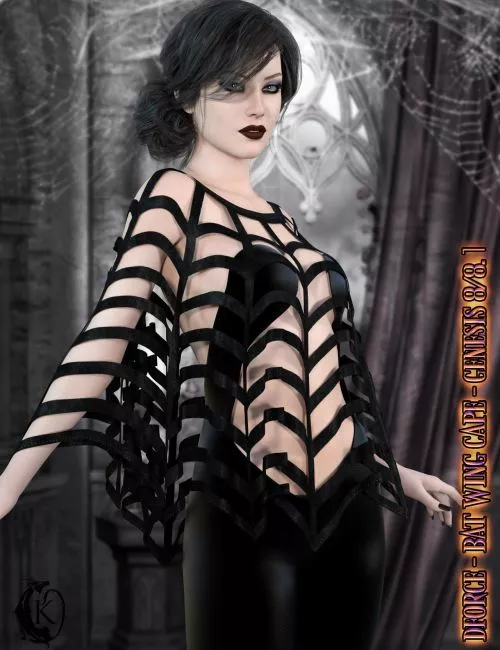
Next up in my basics collection a sexy and spooky halloween inspired cape. A perfect accessory for your favorite Halloween costume.
Basics - Batwing Cape includes:
1 Cape for Genesis 8/8.1
Detailed Textures
Bump and Transparency Maps
Materials:
10 Iray Materials for the Cape
Cape Morphs:
AdjustBreasts
AdjustShoulderL
AdjustShoulderR
CTRLBreastsImplants
CTRLBreastsNatural
FBM Karyssa 8 Body
FBM Kaylee 8 Body
FBM Mika 8 Body
FBMAiko8
FBMCharlotte8
FBMEva8
FBMExpandAll
FBMFitnessDetails
FBMFitnessSize
FBMGirl8
FBMHonni8
FBMJacqueline8_1
FBMLatonya8
FBMMonique8
FBMOlympia8
FBMSahira8
FBMTasha8
FBMThin
FBMVictoria8
FBMVictoria8_1
FBMVoluptuous
FBMZelara8
IntoxicatingCleavage
KillerCleavage
PBMBreastsCleavage
PBMBreastsDiameter
PBMBreastsDownwardSlope
PBMBreastsGone
PBMBreastsHeavy
PBMBreastsPerkSide
PBMBreastsShape01
PBMBreastsShape02
PBMBreastsShape03
PBMBreastsShape04
PBMBreastsShape05
PBMBreastsShape06
PBMBreastsShape07
PBMBreastsShape08
PBMBreastsSize
PBMBreastsSmall
PBMBreastsUnderCurve
PBMBreastsUpwardSlope
PBMGlutesSize
PBMHipSize
dforce is required. when using dforce I recommend applying your body shapes at frame 15 to allow the outfit time to settle around the morphs this is especially useful when using unsupported shapes. Ideally adjustment morphs should be applied at frame 1. Ideally you should apply your pose at frame 30, in some cases you may want to add extra frames after 30 to allow the cloth more time to settle. Some poses may require adjustment. Should you experience mesh explosions check for any parts of the G8 figure intersecting with itself during the animation. This is the most common cause of exploding mesh.
If you have any issues with pokethroughs or strange behavior use Animated instead of Current Frame in your simulation Settings.
When using over clothing you can use the different expand morphs to adjust for pokethrough. You can also increase collision offset if you need to to help with pokethrough.
Clothing loads with dforce settings already applied. You can adapt them to your liking by changing them in the surfaces tab.Other body Morphs will work using autofollow technology. Smoothing can be increased to improve the look of autofollow on more extreme body shapes. Some adjustment may be necessary in extreme poses or with extreme body shapes. Adjustment morphs are included to help with these situations as well as with posing. Autofollow morph results vary.
Thank you very much for your interest in my products :) Please add me as a favorite vendor and never miss a new release! Like Kaleya3d on Facebook for Promotions, Sneak Peeks and product announcements! https://www.facebook.com/kaleya3d/ You can also follow me on instagram for product images and sneak peeks https://www.instagram.com/kaleya3d/
Detail: https://www.renderosity.com/marketplace/products/151980/dforce-batwing-cape-genesis-8
DOWNLOAD HERE:
https://ezvn.net/1cjqja13wkqs/151980-RO.rar.html
https://nfile.cc/jR7yJxAQ/151980-RO.rar
Related News

System Comment
Information
 Users of Visitor are not allowed to comment this publication.