
Alone in the Dark - Poses for Genesis 9 8 81 Daz Content by Sagittarius A
DESCRIPTION
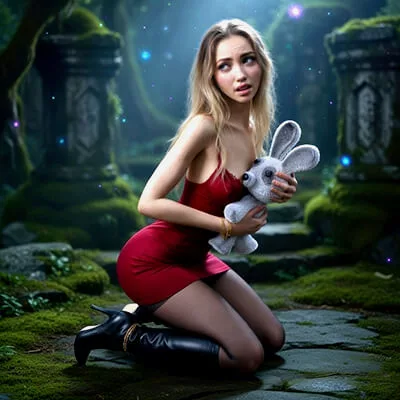
All promo images for this product rendered in Daz Studio 4.15 with Iray render engine.
All raw renders postworked in Flux: added hairs, clothes, jewerly and backgrounds.
************************************************************
*Product Name: Alone In The Dark - Poses for Genesis 9, 8, 8.1
*Copyright 2026 by Sagittarius A
*Contact me via Renderhub Sitemail
************************************************************
System Requirements:
PC/MAC, Daz Studio 4.15 or up
Product requirements:
Genesis 9 from Daz3d
Genesis 8 or 8.1 Female from Daz3d
Optional:
Happy bunny figure
happy-bunny-hd-figure-for-daz-studio
--------------------------------------------------------------------------------------------------------
"Alone In The Dark - Poses for Genesis 9, 8, 8.1" - Hi quality, Poses and Expressions,
designed for Genesis 9, Genesis 8 and Genesis 8.1 and for Happy Bunny figure!
--------------------------------------------------------------------------------------------------------
Included In This Package:
20 POSES FOR GENESIS 9 FEMININE
20 POSES FOR GENESIS 8 AND 8.1
20 EXPRESSIONS INCLUDED IN POSES FOR GENESIS 8.1 FEMALE ONLY
20 POSES FOR HAPPY BUNNY (SEPARATE PRODUCT)
01 MORPHING PILLOW PROP
ALL ZERO POSES AND EXPRESSIONS FOR GENESIS 9, 8, 8.1 AND FOR HAPPY BUNNY
--------------------------------------
INSTALLATION INSTRUCTIONS:
Unzip into your Daz Studio Content directory; make sure "use folder names" option is checked.
--------------------------------------
I would like to read your reviews!!!
USAGE!
* All G9 Poses adjusted for Genesis 9 base figures with Feminine default Shape.
* All G8 Poses adjusted for Genesis 8 and 8.1 base figures with default Shapes.
If your figure having different shapes, you will need to adjust G9/G8 body parts settings manually.
Also, Expressions will work with Genesis 8.1 Female only!
Also, All poses made for Hi-heeled boots!
----------
GENESIS 9 STANDALONE POSES USAGE:
1. Load and then select your Genesis 9 character into scene.
2. Turn limits Off.
3. Go to your library - People:Genesis 9:Poses:sagittarius a:Alone In The Dark: and double click any icons marked from "01" to "20" here.
------------
GENESIS 8 STANDALONE POSES USAGE:
1. Load and then select your Genesis 8 character into scene.
2. Turn limits Off.
3. Go to your library - People:Genesis 8 Female:Poses:sagittarius a:Alone In The Dark: and double click any icons marked from "01" to "20" here.
------------
------------
GENESIS 9 POSES WITH HAPPY BUNNY FIGURE USAGE:
Before usage, you should get and install Happy Bunny figure.
happy-bunny-hd-figure-for-daz-studio
1. Load your Genesis 9 character into scene.
2. Set Mesh Resolution to "High Resolution" with SubDivision Level 2
3. Turn limits Off.
4. Load Happy Bunny Figure into scene:
Go to your library - Props:Happy Bunny: and double click "Happy Bunny" icon there.
5. Sample usage for pose 08:
Load Pillow prop from here: Library:People:Genesis 9:Poses:sagittarius a:Alone In The Dark:Props: and double click "Pillow" icon.
Return to folder with poses: Library:People:Genesis 9:Poses:sagittarius a:Alone In The Dark:
Select your Genesis 9 figure and double click "08" icon
Select "Happy Bunny" figure and double click "08-Happy Bunny" icon
Select "Pillow" Prop and double click "08-Pillow" icon
------------
------------
GENESIS 8/8.1 POSES WITH HAPPY BUNNY FIGURE USAGE:
Expressions will work with Genesis 8.1 Only!
Before usage, you should get and install Happy Bunny figure.
happy-bunny-hd-figure-for-daz-studio
1. Load your Genesis 8/8.1 character into scene.
2. Set Mesh Resolution to "High Resolution" with SubDivision Level 2
3. Turn limits Off.
4. Load Happy Bunny Figure into scene:
Go to your library - Props:Happy Bunny: and double click "Happy Bunny" icon there.
5. Sample usage for pose 08:
Load Pillow prop from here: Library:People:Genesis 8 Female:Poses:sagittarius a:Alone In The Dark:Props: and double click "Pillow" icon.
Return to folder with poses: Library:People:Genesis 8 Female:Poses:sagittarius a:Alone In The Dark:
Select your Genesis 8/8.1 figure and double click "08" icon
Select "Happy Bunny" figure and double click "08-Happy Bunny" icon
Select "Pillow" Prop and double click "08-Pillow" icon
------------
That's All! :) Have a great renders!
SUPPORT LINK
https://www.renderhub.com/sagittarius-a/alone-in-the-dark-poses-for-genesis-9-8-81
DOWNLOAD
https://ezvn.net/penk85ukeqbj/renderhub-alone-in-the-dark-poses-for-genesis-9-8-81.rar.html
https://nfile.cc/LAOvdVJj/renderhub-alone-in-the-dark-poses-for-genesis-9-8-81.rar
Related News
System Comment
Information
 Users of Visitor are not allowed to comment this publication.