
Blender Launch Pad | CGBoost
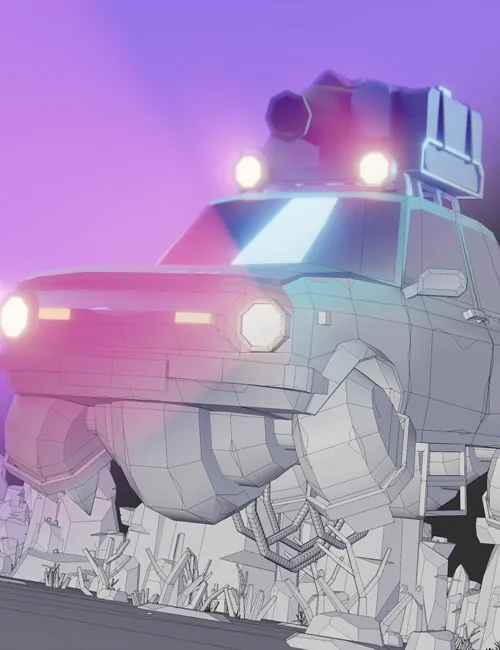
Tired of learning Blender from random YouTube tutorials?
Starting Blender can be quite overwhelming, and learning from random YouTube videos can slow down your progress, since you won't have a clear path to follow.
That's why we created this course to teach you all Blender fundamentals in the most straightforward way, so you don't miss anything important.
Learn navigation, modeling, texturing, animation, lighting, rendering and much more, while creating your own beautiful 3D animation with an easy-to-follow project.
Part 1 – Car Animation Project
15 Chapters 180+ Lessons 15+ hrs running time
Chapter 1 - 3 – User Interface, Navigation and more
Learn how the user interface works, how to navigate, how to work with objects and much more. These chapters are especially important to get the hang of Blender and make the following chapters more enjoyable.
49 tutorials | ~3:40 hrs running time
Chapter 4 & 5 – Modeling Fundamentals and Exercise
Learn all the important modeling fundamentals, workflows, tools and how to solve certain modeling problems. We will practice modeling by creating a car and environment assets, step by step.
64 tutorials | ~5:05 hrs running time
Chapter 6 & 7 – Shading Fundamentals and Exercise
Learn all important fundamentals on how to work with materials in Blender (this is called "shading"). We will practice shading by colorizing all assets which were modeled in the previous chapters.
64 tutorials | ~5:05 hrs running time
Chapter 8 & 9 – Particle Simulation and World Creation
Learn all important fundamentals about the particle simulation, and how to assemble all previously created assets into a big desert scene.
11 tutorials | ~1:10 hrs running time
Chapter 10 & 11 – Lighting Fundamentals and Exercise
Learn all the important fundamentals on how to work with lights in Blender. We take a look at different light types, important settings, how to use the background to light up your scene and how to work with indirect and volumetric lighting.
13 tutorials | ~1:05 hrs running time
Chapter 12 & 13 – Animation Fundamentals and Exercise
Learn all important fundamentals on how to animate 3D objects, properties and shapes. We will also animate the flying car, different camera shots and crashing the car into a rock.
20 tutorials | ~1:50 hrs running time
Chapter 14 & 15 – Rendering Fundamentals
Learn all fundamentals on how to render out an animation and convert it into a video file you can share with the world. The animation above is the final result of this course.
16 tutorials | ~1:05 hrs running time
https://www.cgboost.com/courses/blender-launch-pad
https://ezvn.net/dlwh7zi8gqa5/Blender-Launch-Pad.rar.html
https://nfile.cc/qP8Dzz3q/Blender-Launch-Pad.rar
Related News


System Comment
Information
 Users of Visitor are not allowed to comment this publication.