
Smart Content Finder for Daz3D v1.5
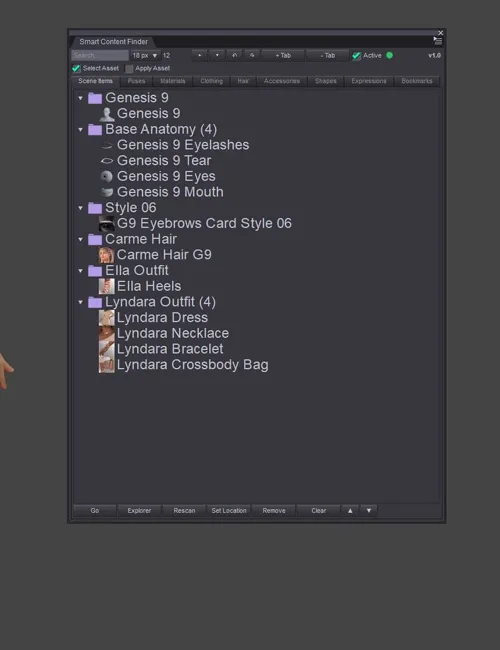
SMART CONTENT FINDER FOR DAZ STUDIO V1.5
Works with Daz Studio 4 and 6
SMART CONTENT FINDER is at the moment Windows-only (Windows 10/11, DAZ Studio 4.5–4.x, and DAZ Studio 6)
STOP SEARCHING. START CREATING.
Ever loaded a character, outfit, pose, material, hair, or accessory and later wondered "where did that file come from?"
Smart Content Finder instantly locates content already in your scene and jumps you back to the right Content Library folder, with about 99% accuracy. No more digging through endless folders for assets you\'ve already used.
WHAT IT DOES
• Tracks the content in your scene, live
• Organizes it into easy‑to‑browse tabs
• Finds original locations including custom & mapped libraries
• Jumps you straight to the Content Library folder
•Search & filter instantly
• Bookmarks and custom tabs
• Remembers locations for faster future searches
SUPPORTED CONTENT
Figures • Clothing • Hair • Materials • Poses • Expressions • Shapes • Accessories • Bookmarks
PLUGIN + SCRIPT INCLUDED
• Full DLL plugin (recommended) a dockable pane that updates live as you work
• Script version
V1.5 UPDATE
• Performance Fixes
• Panel auto‑recovers if it lands off‑screen after a resolution or monitor change, it re‑centers when opened
• Tidier tabs automatic entries stay capped to a sensible limit, while folders you add by hand are pinned and never removed
EARLIER UPDATES
• V1.4 Better locating for Genesis 1 & 2, clothing & full outfit sets
• V1.3 Custom & mapped libraries, resizable panel, more reliable DS6 tracking
• V1.2 Daz Studio 6 support V1.1 Hide/unhide, quick delete, performance
IMPORTANT NOTES
• Never moves, modifies, or deletes your content files
• Manual location tools included for unusual folder layouts
• ~99% accurate, not perfect a few unusually‑packaged items may need a quick manual pick
•Cache is located here:
Computer\\HKEY_CURRENT_USER\\SOFTWARE\\DAZ\\Studio4\\LocateItemPanel
•You can also clear it from the plugin:
1. Go to the Scene tab.
2. Click Clear.
3. Then click -Warning Clear Cache+Items.
Spend less time searching. Spend more time creating
Detail Link: https://www.renderhub.com/heiwa-interactive-arts/smart-content-finder-for-daz3d
DOWNLOAD
https://ezvn.net/ce6r88r0t6m9/smart-content-finder-for-daz3d.rar.html
https://nfile.cc/LbzlzkKL/smart-content-finder-for-daz3d.rar
Related News


System Comment
Information
 Users of Visitor are not allowed to comment this publication.