
Squish and bulging Geometry Nodes group for Blender
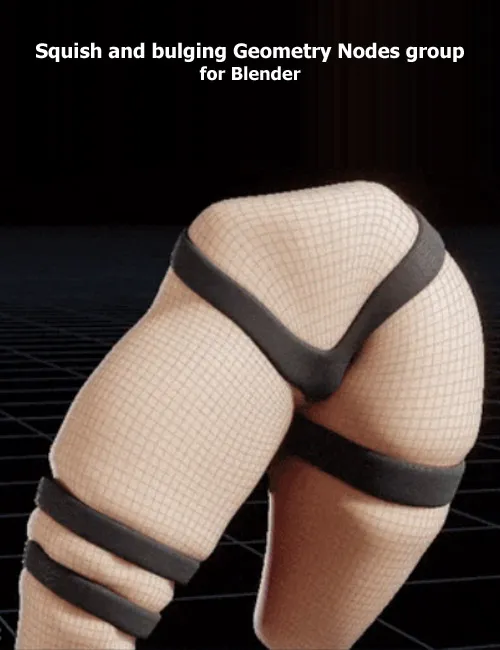
This is a simple Geometry Nodes group that will allow you to deform a model using any other mesh. The deformation consists in a squish-in at the place of contact, and bulge-out at the borders. You need to create a very simple "dummy" for the bulge-out (just scale a little in the vertical axis for most cases).
This .blend includes:
-
A rigged model that is deformed
-
Two different deformers with their corresponding dummies
-
An even more simplified example
In order to import this to any project:
-
Drag and drop this .blend into your project
-
Append
-
NodeTree
-
SquishBulge
-
Add the Geometry Nodes modifier to your 3D model
-
Assign the SquishBulge Node Tree
Usage:
-
Add the Geometry Nodes modifier after the Armature modifier if your model is rigged
-
You have to add one Geometry Nodes modifiers per deforming mesh
-
Fields:
-
Deformer: main deforming mesh. This is the one that squishes-in
-
DeformerDummy: dummy deformer. It's supposed to be bigger and follow the Deformer. Makes this child of the deformer if you need to. This is the one that bulges-out.
-
In: the amount to be squished-in
-
Out: the amount to be bulged-out
-
SubDiv: how many subdivisions should be applied at the end. It's recommended to apply subdivisions only at the end, and not before, for best results.
-
Disclaimer:
I'm not able to provide support for this project. Consider it a template or starting point, rather than a complete solution.
SUPPORT LINK
https://amarilloarts.gumroad.com/l/ijfki
Product ID: gumroad-ijfki
DOWNLOAD
Related News

![ShapeMuse v1.0.0 [Blender Addon]](https://i.ibb.co/4Z7JMVPK/2wehjt.jpg)

System Comment
Information
 Users of Visitor are not allowed to comment this publication.